
It is Tuesday. The menu has not changed. There is no new product, no event and no offer to announce. You open Instagram, look at the empty caption box and close it again.
This is a normal week for a small business. It is also where a lot of social media advice stops being useful. “Share something exciting” is not much help when your job is to do familiar work well.
The answer is usually not to invent news. It is to look at the business from the other side of the counter. You know how the food is made, what a first appointment involves and which questions come up every day. A person thinking about becoming a customer may know none of that.
When nothing is new, post something that helps that person choose, understand or picture a visit. Show one part of the work. Answer one real question. Explain one choice. Below, we will turn those ordinary moments into posts for a restaurant, a salon and a service business, then work out how to keep going without starting from scratch each week.
Start with what a customer does not know
“We care about quality” gives a reader very little to work with. What does quality mean here? A better post shows the thing behind the claim: the seam a tailor checks before a fitting, the way a cafe packs a takeaway cake, or the questions a stylist asks before picking up the scissors.
Try this with something you did today. Write down the task, then ask why you did it that way. Finally, ask whether the answer would matter to a customer. That last step is important. A photo of your desk is just a photo of your desk unless there is a useful story in it.
For example, “getting ready for lunch” could be any restaurant. “We keep the dressing separate on takeaway salads so the leaves stay crisp on your walk back” tells a customer what to expect. Use that detail only if it is true, of course. The aim is to notice good material, not add a story to work you do not do.
This is an editorial approach, not a promise about reach. In its explanation of Explore recommendations, Meta describes using people’s past likes, saves and shares to find related content. Our takeaway is simple: think about what a particular reader would find worth looking at or keeping, rather than whether your business has made an announcement.
A restaurant can tell three stories about the same lunch
Imagine a neighbourhood restaurant called Corner Table. Its tomato pasta has been on the menu for months. Nothing about the dish is new, but someone choosing where to eat this week may never have seen it.
Instead of making another graphic that says “Join us for lunch,” the owner takes three photos during a normal day: ingredients before service, the finished plate, and a table by the window. Each gives the restaurant a different subject to write about.
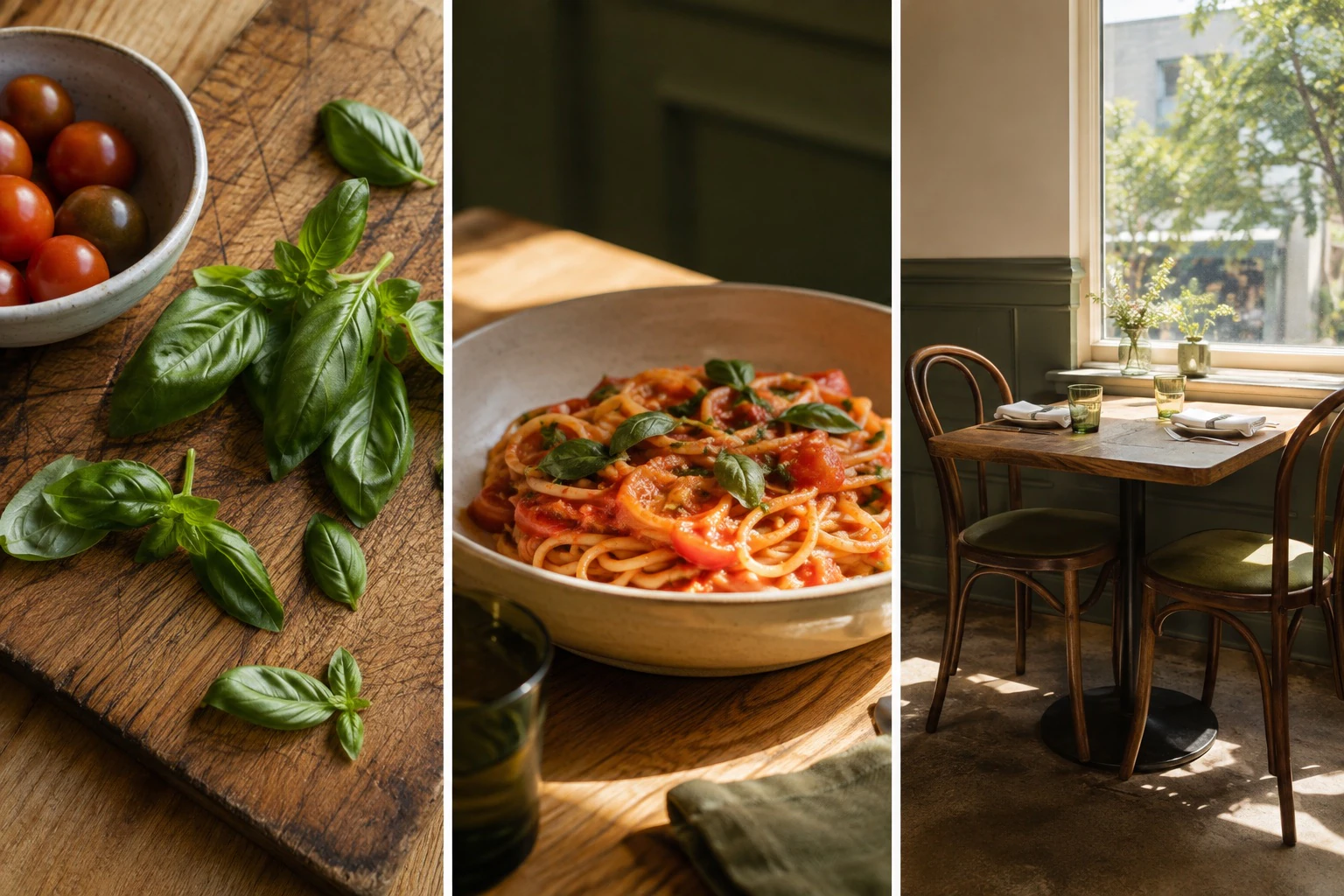
The ingredient photo needs a detail, not a slogan. If the cook tears the basil just before serving, explain that. If the tomatoes come from a particular grower, name them with permission and say what you like about this batch. If neither is true, do not borrow it for the caption. Ask the cook what is worth noticing.
The plate photo has a simpler job: help someone decide what to order. A possible caption for our fictional restaurant would be:
Tomato pasta, torn basil and a little parmesan. The same lunch we have been making all summer. If you like a simple sauce and plenty of bread for the bowl, start here.
There is no forced joke, discount or claim that it is the best pasta in town. The caption describes the food and gives the reader a way to decide whether it is for them. On a real account, check that the ingredients and availability match what you serve.
The room photo answers another question: would I like spending time here? You might explain when the room is quiet, whether there is outdoor seating, or how to book a larger table. A useful caption could be as plain as, “Coming with a pushchair? Tell us when you book and we will help you find a table with room beside it,” if that is something the restaurant can offer.
These do not need to go out on three days in a row. Keep them for different moments. Seen together on a profile, they show the food, the care and the setting. Seen alone in someone’s feed, each still makes sense. That is more useful than a beautiful grid whose individual posts say very little.
A salon can answer the question before the booking
For a salon, the useful story may be less about what is new and more about what a first-time client is unsure of. Will the stylist listen? What if the reference photo does not suit their hair? What should they ask for if they know what they dislike but cannot name the cut they want?
Take a fictional salon called Sunday Studio. Rather than posting another finished haircut with “Obsessed with this look,” it could explain how a consultation works. The subject is something the team does every day. The value is that a new client can picture the conversation.

Here is a caption the salon could adapt to its own process:
Bring the reference photos, even if they all look different. Tell us what you like in each: the length in one, the shape in another. Then tell us how much time you want to spend styling it at home. That gives us somewhere useful to start.
This works as a single photo and caption. If clients need more detail, it could become a short carousel: the first slide asks what to bring, the next explains reference photos, another covers the daily routine, and the last says what the consultation includes. Every slide should answer part of the same question. Do not stretch one sentence across six slides just to fill a format.
Another week, answer a different question: what happens if someone arrives unsure about colour, or which appointment to choose when booking online. You are not repeating the same post. You are explaining the service one decision at a time.
For real client photos, ask before taking and sharing them. Keep a record of what the person agreed to, and respect a no without making it awkward. If you cannot show a client, use the tools, the room or a team member demonstrating the process. A made-up before-and-after is never a substitute for evidence of your work.
If the work happens on a screen, show the answer
A service business does not need to pretend its work is more visual than it is. For a fictional accounting firm called Plain Numbers, another stock photo of a calculator adds little. A clear answer to “What should I bring to our first meeting?” may be much more useful.
The firm could make a simple sample document showing how to prepare. Use invented names and blank amounts, clearly marked as an example. The caption might read, “Before our first call, write down what your business does, which tools you use to keep records, and the three questions you most want answered. We will tell you which documents we need next.” The firm should adapt that wording to its actual process.
Notice what this post leaves out. It does not try to teach tax law in a caption. It does not show private client records. It answers one small question and makes the first step easier to understand.
The same approach works for a designer explaining what makes a useful brief, a repair shop showing what information to send with a fault, or a tutor describing a first lesson. When the work is hard to photograph, explain what a customer needs to know before it begins.
Keep a record of the week, not a list of random ideas
The hard part is remembering these moments when it is time to post. Keep one shared note on your phone. When someone asks a good question, write it down in their words. When a colleague explains a choice well, save that explanation. Take a few photos while the work is happening, when it is safe and does not get in the way.
At the end of the week, choose a small set of posts you can finish. For Corner Table, that might be the pasta photo with a clear description, the seating answer, and a short look at preparation. Three is a manageable example, not an Instagram rule. There is no need to fill seven slots just because the calendar has them.
Choose the format after the subject. A finished dish may only need a photo. A process with several useful steps may suit a carousel. A movement that is hard to explain, such as shaping dough, may be better shown in a short video. Match the amount of content to the answer, rather than forcing every idea into the format you used last time.
Give photos a consistent feel by using similar light and natural colours. Keep graphic text short enough to read on a phone. You do not need alternating quote tiles, matching borders or a nine-post puzzle. The business should be recognisable without every post looking identical.
You can return to the same subject later. Keep the question, but bring a new example, a clearer explanation or an updated detail. Recheck prices, opening hours and booking information before reusing anything. Repetition becomes useful when the reader gets something from it; changing the background colour on an old sales pitch does not add much.
Judge the posts by what you wanted them to do
Before publishing, finish this sentence: “After seeing this, someone should understand…” If you cannot finish it, the post may need a clearer point. For a restaurant photo, the answer could be as simple as what the dish is and whether they want to try it.
Then look for the response that fits. A preparation guide might earn saves or follow-up questions. A post about the room might lead to questions about a group booking. A menu post might prompt someone to ask whether a dish is available. Likes are one signal, but they do not tell you whether the post helped someone take the next step.
Keep a short record of the topic, format and useful responses. Where you can, ask new customers how they found you. Look across several related posts before deciding a subject does not work. One quiet post is not enough to prove that the idea is wrong, just as one popular post does not prove that it brings customers.
For platform-specific advice, check the guidance in your Instagram professional dashboard. Meta’s Best Practices section covers creation, engagement and reach, including account-specific tips. Use that alongside your own results rather than treating someone else’s posting schedule as a rule for your business.
Where Unstudio fits
You still know the details that make these posts worth reading. Unstudio helps with turning that knowledge into content. It starts with your website and the information you share, then plans posts, writes captions and creates the designs. You can review a draft and ask for changes in plain words.
A useful request is specific. For our restaurant example: “People ask whether we have room for pushchairs. Our window tables do, if guests ask when booking. Explain that in a post using the room photo I uploaded.” Replace those details with your own. A question, a checked answer and a real photo give Unstudio something useful to work with.
You do not need a launch to have something worth saying. Start with one thing a customer asked this week, and answer it as clearly as you would in person.
See what Unstudio could post for your business.
The businesses and sample captions in this guide are fictional teaching examples, not customer case studies or claims of results. The three editorial images were created with AI. Use your own business details and photos when putting these ideas into practice.