Marketing with AI: better prompts are only the beginning
AI can help you research, write, design and learn. The bigger change comes when those jobs share the same understanding of your business.
Unstudio ·
Ask ChatGPT or Claude for a marketing idea and you can get a useful starting point in the same conversation. Give them a clear brief, and they can help you go much further.
That is a real change. A small business can explore a campaign, make sense of research, improve a product description or work through several creative directions without starting each task from a blank page.
But there is a familiar moment after the first good answer. The caption is nearly right. The image needs work. The product details are in another file. You liked a design last week, but cannot remember which version. And nothing is ready to publish yet.
This is not a sign that AI is useless. It is a sign that marketing is more than producing a good answer.
The useful question is no longer just, “Which AI writes the best copy?” It is also, “How much of the work around that copy do I still have to manage?”
AI changes more than the writing
Writing is often the first thing people try because it gives an immediate result. But some of the most useful work happens before a headline exists.
Take Morrow Ceramics, a fictional small pottery business we will use throughout this article. Its products, policies and examples below are invented for teaching, not a customer case study.
Imagine the owner has a product sheet, photographs and a set of customer questions with personal details removed. Instead of asking for “ten engaging post ideas,” they can ask an AI to group those questions, point to the wording behind each group and separate what customers actually asked from what the AI thinks they might ask.
That last distinction matters. A model can invent a convincing customer profile. That does not make it research. A useful research summary should lead you back to the source, and leave gaps visible when the evidence is missing.
Suppose the questions keep returning to the size of a bowl. The next marketing task may not be a clever campaign at all. It may be a plain photograph of the bowl beside a plate, with its measurements. The AI has helped turn a pile of words into a clearer decision about what to show.
Planning becomes more useful too. You can ask how to balance product information, process stories and practical advice, given the photos and time you actually have. A plan for a maker who can film once a month should look different from a plan for a team with a full-time videographer.
During production, AI can help turn that plan into copy, design directions and alternate ways to explain the same idea. It can challenge a vague headline or shorten a caption without losing the detail that makes it useful. The owner still needs to check that a generated image has not changed the shape, finish or scale of the real product.
After publication, AI can help organise the results you give it. The important step is to ask a business question: did more people ask about bowl sizes, visit the product page or buy? A tidy summary of likes alone does not answer that. Our guide to measuring useful customer responses goes into this distinction.
Across these jobs, AI gives you more room to think and try things. The danger is spending all that room on more output, rather than on better decisions.
Does AI actually save marketing time?
It can. The research does not support a blanket claim that using ChatGPT makes work take longer.
In a 2023 experiment, Shakked Noy and Whitney Zhang assigned writing tasks to 453 college-educated professionals. Access to ChatGPT reduced average completion time by 40%, while assessed quality rose by 18%. These were defined professional writing tasks, not a month of running a small business’s marketing. Read the study in Science.
The limits are especially relevant here. MIT’s account of the research notes that the tasks did not require detailed knowledge of a particular company or customer, and factual accuracy was not fully evaluated. Those are exactly the details an owner must care about before publishing. Read MIT’s explanation of the study.
A separate experiment with 758 BCG consultants found that GPT-4 helped on tasks within its capabilities, with participants completing those tasks about 25% more quickly. On one harder task outside those capabilities, AI users were about 19 percentage points less likely to reach the correct answer. First shared in 2023 and published in Organization Science in 2026, the study shows why being helpful on one task does not establish reliability on the next. It did not test Unstudio or current models. Read the published research.
For marketing, it helps to separate the time to make a draft from the time to finish the job. Here is a deliberately simple example. These are made-up numbers, not measured averages or a comparison between products.
| Owner’s work | Before | Only drafting gets faster |
|---|---|---|
| Gather facts and choose the idea | 20 min | 20 min |
| Write the first draft | 25 min | 10 min |
| Find images and finish the design | 45 min | 45 min |
| Check, revise and schedule | 30 min | 30 min |
| Total active time | 120 min | 105 min |
Fifteen minutes saved is worthwhile. But a fast first draft has not removed the rest of the afternoon. If you then request twenty more versions, spend longer choosing and start over on the image, you can spend the saving without noticing.
That is not proof that AI increased everyone’s workload. It is a reason to measure the whole job.
For your next few pieces of content, note the active time spent preparing, making, correcting and arranging publication. Keep waiting time separate. Decide what “finished” means before you begin: the right facts, a usable design, a checked caption and a clear next step. Otherwise, a tool that produces more options can look productive while leaving you with more decisions.
Useful memory is more than a long conversation
A good marketer needs to remember what is true about your business, what has changed and what you have already tried. These are different kinds of information.
For Morrow, “we make tableware” is useful background. “The oat bowl is 18 cm wide” is a product fact. “Do not call our work rustic” is a writing rule. “The blue glaze is unavailable this week” is a temporary constraint. “This image was approved, but the caption still needs changing” is unfinished work.
If all five sit in a long conversation with no clear status, somebody still has to decide which details apply today.
It would be wrong to say that ChatGPT and Claude can only work this way. OpenAI’s current documentation describes projects that bring related chats, files, instructions and sources together. Claude also offers project knowledge, and its memory can be kept separate for each project. Your holiday planning does not have to share a working space with your business. See ChatGPT projects and Claude’s project memory.
Both can work with organised business documents. Saying that general-purpose AI “cannot store structured information” would miss the point. You can give it a product table, a style guide and files that record decisions. With the right tools and setup, you can build a much wider workflow around them.
The difference is how much of that organisation you need to design and maintain yourself.
Consider a price change. A note saying “the bowl is now £28” is not enough if an older product sheet says £24 and last month’s approved image still shows the old price. The useful questions are: which source is current, which work uses that fact, and what needs checking before it goes out?
No memory feature should be treated as a promise that every old asset will update itself. A careful workflow keeps the source, the correction and the affected work easy to find. That is more useful than simply having a large amount of history.
It also helps to set limits on memory. A one-off request to make a holiday post brighter should not quietly become a rule for every future design. A rejected image is evidence about that image; it is not always a new brand policy.
A brand needs a visual language, not just a nice image
An image can look good on its own and still look wrong beside the rest of your work.
A visual language is a set of choices that makes different pieces feel related: the colours that lead, the type you use, the way products are shown, how much text belongs in an image and what you consistently leave out.
For our fictional ceramics business, that might mean clay-coloured backgrounds, dark ink, clear product shapes and short, matter-of-fact lines. It does not mean making the same layout forever. An explanation, a product detail and a process story should each have room to look different.
Product detail
Room for
the good bits.
A useful answer
How wide
is wide?
The making
A brush mark.
Not a mistake.
There is a useful warning in creativity research. A 2024 experiment by Anil Doshi and Oliver Hauser found that access to AI ideas improved ratings of short stories, but the resulting stories were also more similar to each other. This was a fiction-writing study, not a test of brand design or social media results. It suggests a risk worth watching, not a rule that all AI work looks the same. Read the study in Science Advances.
Our practical takeaway is to give AI something more specific than “make it beautiful.” Give it real product references, examples you have chosen, reasons behind those choices and things your business would never say.
For Morrow, “premium handcrafted quality” could belong to almost anyone. “You can see where the glaze brush turned” points to a particular feature, if it is true of the product. The second gives both the writing and the image a job.
The same principle applies to a bike repair shop or a restaurant. Clear prices, real processes and honest answers create better material than a list of fashionable adjectives. AI can help express those details. It cannot replace the need to have them.
Where Unstudio changes the work
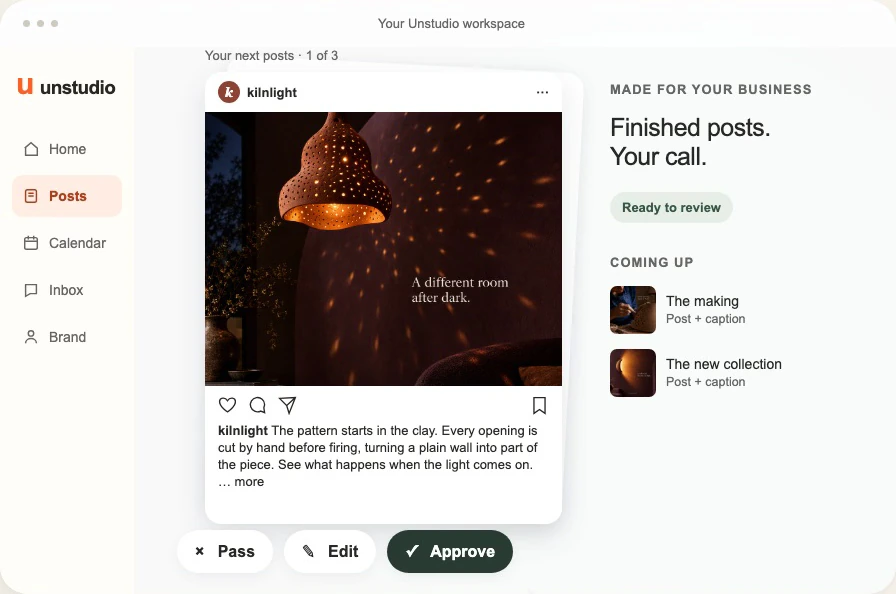
This is why we built Unstudio around an ongoing marketing workspace, rather than a sequence of unrelated requests. ChatGPT and Claude are useful across a huge range of work. Unstudio is focused on the recurring job of planning and making social content for a business.
Its advantage is not a claim that it has a smarter model. It is that your business information, visual direction and the work being made have places to live together.
Your business stays part of the brief. Unstudio keeps business context such as your audience, voice, products and current activities. Its product records can connect a name and description to a source page and available product images, with a price where one has been captured. You can add and correct brand information rather than relying only on an old chat message.
For Morrow, that means the starting material can be an actual bowl and its known details, not an AI’s idea of what a pottery business probably sells. It does not mean every product or live stock change is automatically known. The available sources still matter, and changing facts need checking.
Your designs have a history. Unstudio keeps versions of the content made in the workspace, including its images and captions, with feedback and decisions. That gives an edit a specific piece of work to refer to. “Change the headline” and “make a new version” are different requests, and it helps to have the existing design available when making either one.
This is not a claim that Unstudio automatically holds every design your business has ever made. Work and references need to be present in the workspace. The useful benefit is continuity across the content you are making there.
The Unstudio approach
Context that stays with the work.
Business & products
Facts, source pages and product references
Voice & visual direction
Writing guidance, colour roles and image style
Content & decisions
Saved versions, edits and feedback
Results & follow-up
Available engagement data to inform future work
Available results feed back into planning. Publishing and results access depend on supported connections and your settings.
Your visual language is reusable. Brand information includes colour roles, fonts and image direction. Content guidance can hold writing and visual preferences. These give future work a starting point that belongs to your business, while allowing different ideas and layouts. They are guidance to review against, not a guarantee that every generated design will be right first time.
You can see what has happened. A plan, a draft, an approval and a published post are not the same thing. Unstudio keeps content status and a work history, alongside the tools to review, revise and arrange supported publishing. You can return to the work itself rather than reconstruct the whole process from a conversation. Publishing depends on connected accounts, supported formats and the settings you choose.
Results can feed back into the next round of work. With supported accounts connected and performance data available, Unstudio can bring engagement results back into its business memory and planning automatically. You do not have to turn every available metric into a new message explaining what happened. The connection between making content and learning from it is part of the workflow.
A general AI assistant can help analyse results too. But getting an answer from a spreadsheet is different from keeping that process running. Someone needs to connect the right accounts or provide fresh reports, keep access working, match the numbers to the right posts and carry the findings into the next brief. For an owner who just wants their marketing handled, that is a separate job to learn and maintain, not a straightforward prompt.
For Morrow, the useful question might be whether a bowl-size explanation deserves a follow-up. Where enough suitable results are available, Unstudio can use performance evidence to inform another angle to try. One strong post is a reason to test, not proof that every future post should copy it. And learning from reach or saves is not the same as knowing what caused a sale: bookings and revenue need their own evidence.
The advantage is not that ChatGPT or Claude cannot be connected to data. It is that you do not have to build and run that marketing feedback loop yourself around a general-purpose assistant. Unstudio brings the supported parts together, while you still provide business changes and results that the connected platforms cannot see.
Together, these are the parts that can reduce repeated briefing, searching for files, checking which version is current, gathering results and moving work between separate steps. For an owner doing those jobs week after week, that is the opportunity for meaningful time savings.
We have not presented a timed, head-to-head study showing that Unstudio saves a particular number of hours compared with ChatGPT or Claude. The research above does not establish that either. The honest promise to test is simpler: can you get suitable content finished with less active work from you?
A fair trial is to take a real week’s brief, use the same facts and quality standard, and count all your time: setup, prompting, finding assets, corrections and review. Include the initial effort of giving any system good information. Count work that actually reaches a usable state, not just the number of drafts it creates.
Choose the amount of marketing you want to manage
If you enjoy developing ideas, have a strong file system and want close control of each creative step, ChatGPT or Claude can be excellent parts of your setup. A dedicated project with maintained source files is a much fairer comparison than a blank chat. Their broader tool and workflow features also mean they should not be dismissed as text boxes.
If your problem is that you are still the person connecting every step, Unstudio is the more focused option. Its value is in bringing business context, brand direction, content, work status and available results into a marketing workflow you do not have to assemble from scratch.
That does not remove your judgment. You know when a price has changed, when a product photograph is wrong and when a sentence does not sound like you. A useful AI marketing setup makes those corrections easier to carry forward, rather than asking you to start again.
Better models make more things possible. Better context helps make the work yours. A connected workflow is what gives you a chance to spend less of the week managing it.
That is what Unstudio is built for: not just helping you make the next piece of content, but helping you keep the work going.
Written by Unstudio about its own product. Research findings are described within the tasks studied, not as promises of marketing results. Morrow Ceramics, its details and the time example are fictional. Product documentation and the Unstudio implementation were checked for this draft on September 21, 2026; features and availability can change.